
Best OBD2 App for Live Data — Tested on a 1.0 TSI With Real Readings
This article contains affiliate links. If you purchase through these links I may earn a small commission at no extra cost to you.
If you’ve just bought an ELM327 Bluetooth adapter — on iPhone or Android — and you’re staring at a list of OBD2 apps not knowing which one to download, this is the article you need.
I tested three of the most downloaded OBD2 apps on my stage 1 remapped Skoda Rapid 1.0 TSI using a Vgate iCar Pro Bluetooth 4.0 BLE on iPhone. Same car, same adapter, same conditions for all three. All three apps are available on both iPhone and Android — and the findings apply equally to both platforms, with one difference covered in the adapter section below. What I found was that the apps differ significantly in what they actually show — and the most popular one displayed a short term fuel trim reading of 130% on a perfectly healthy engine at warm idle. The correct reading was 1.56%.
The Adapter — Vgate iCar Pro Bluetooth 4.0 BLE
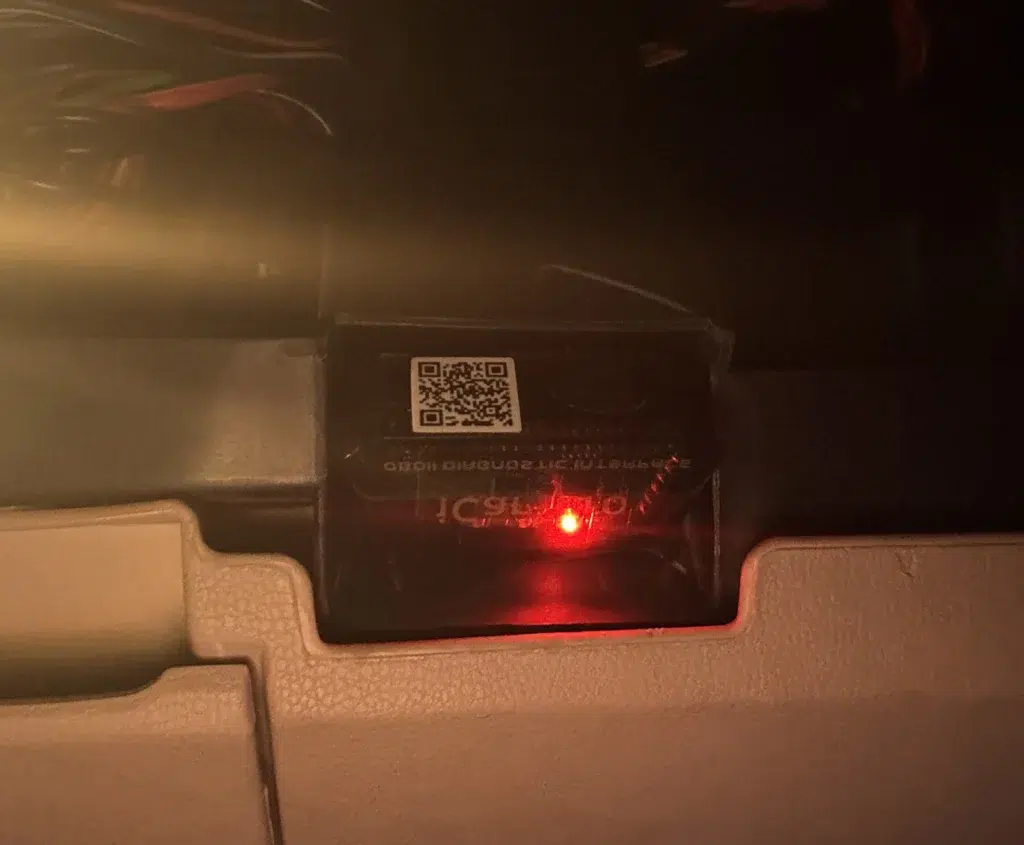
The app is only as good as the adapter it connects to. A cheap unbranded ELM327 clone will block certain PIDs regardless of which app you use, which means some readings simply won’t appear even if the app supports them in theory.
I used the Vgate iCar Pro Bluetooth 4.0 BLE throughout all three tests. It connects reliably over Bluetooth on iPhone, pairs quickly, and passes through the full range of PIDs including fuel trim data, O2 sensor voltage, boost pressure, and MAP. If you’re buying an adapter specifically for diagnostic work on a European or any other car this is a solid choice at its price point.
If you are buying the Vgate iCar Pro specifically for iPhone, make sure you select the Bluetooth 4.0 BLE version — it is clearly marked as iOS and Android compatible on the product listing. The Bluetooth 3.0 version of the same adapter is Android only and will not pair with iOS. Both versions look identical physically so check the listing carefully before buying. You can check the current price and availability of the Vgate iCar Pro Bluetooth 4.0 BLE on Amazon
If you’re unsure how to connect it to your car and get started, our step by step guide on how to use an OBD2 scanner walks through the full process with real screenshots.
Car Scanner ELM OBD2 — The App I Actually Use
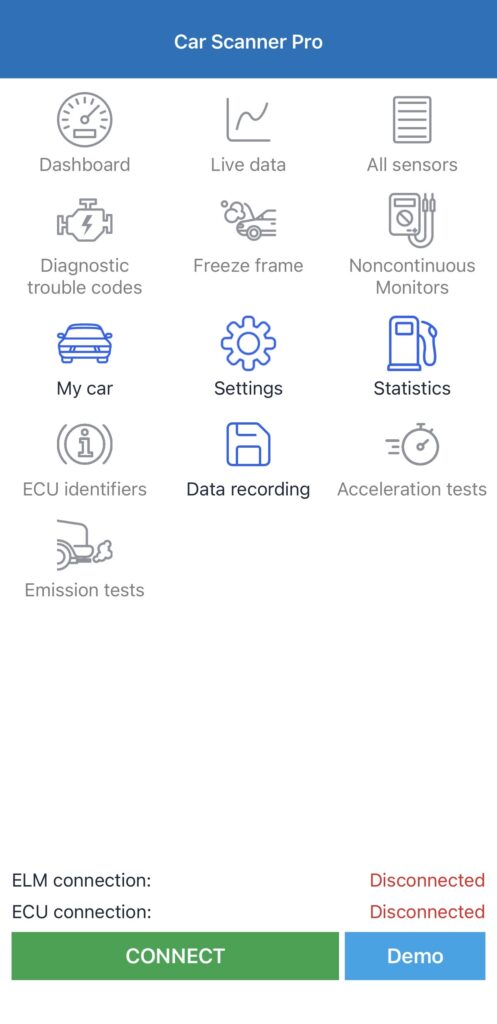
Car Scanner is the app I open every time I want to check something on my car. After testing all three this is not a close decision.
Setting it up
When you first open Car Scanner it shows the home screen in grey — everything greyed out until you connect. The feature list is immediately apparent — Dashboard, Live data, All sensors, Diagnostic trouble codes, Freeze frame, Data recording, ECU identifiers, and Coding and Service. Everything is accessible from one screen with no buried menus.
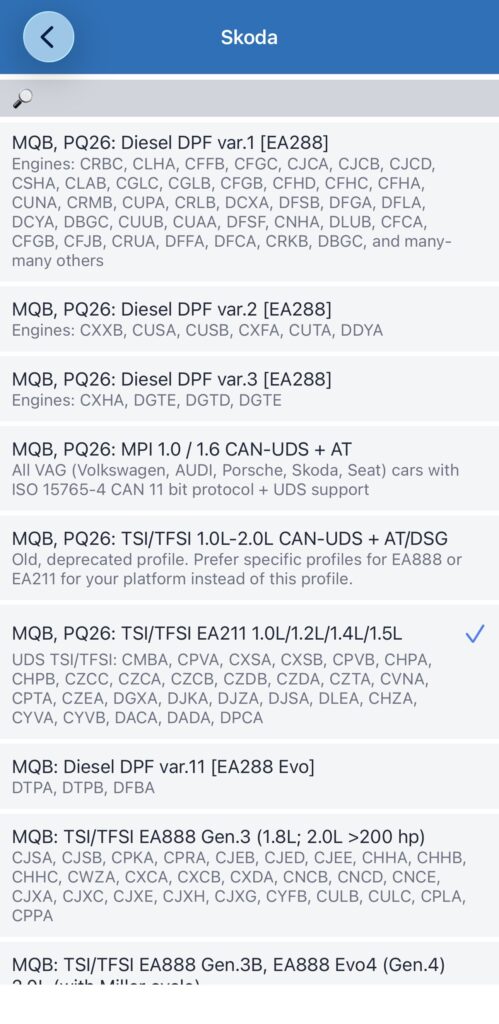
The one friction point is the engine profile selection. Car Scanner does not auto-detect your ECU configuration — you have to manually select your car make, model, and engine from a list. For a Skoda with the 1.0 TSI engine this means scrolling through the Skoda profile list and selecting MQB, PQ26: TSI/TFSI EA211 1.0L/1.2L/1.4L/1.5L. Choosing the wrong profile results in a failed connection with no clear error message — which is how I spent ten minutes on my first attempt before selecting the correct EA211 profile.
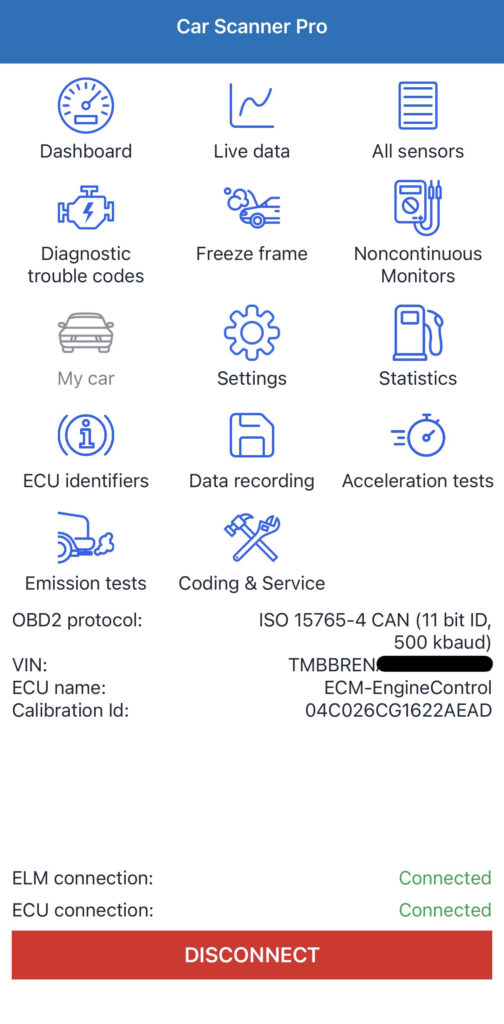
Once the correct profile is selected, connection takes around 4 seconds. The connected home screen confirms everything is working — VIN detected, ECU identified as ECM-EngineControl, protocol confirmed as ISO 15765-4 CAN 11 bit ID 500 kbaud, ELM and ECU connections both showing green.
What it shows on a 1.0 TSI
This is where Car Scanner separates itself from the other apps. At warm idle with the engine at 91°C coolant temperature, the live readings screen showed STFT at 1.56%, LTFT at 0.78%, O2S1 voltage at 0.66V, fuel/air ratio at 14.63, calculated boost at -8.89 psi, and MAP at 5.8 psi. Every sensor I wanted came through correctly with a 2 to 3 second update delay.
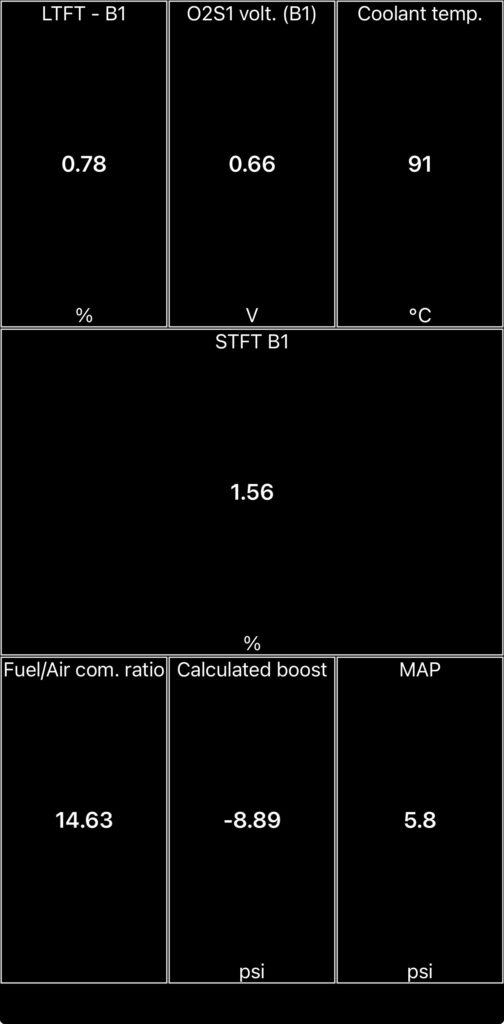
These are accurate numbers that match what you would expect from a healthy remapped 1.0 TSI at warm idle in closed-loop mode. The STFT of 1.56% is a small positive correction consistent with the engine running very slightly lean — well within normal range. The 0.66V O2S1 voltage confirms the upstream sensor is active and reading correctly.
Fault codes
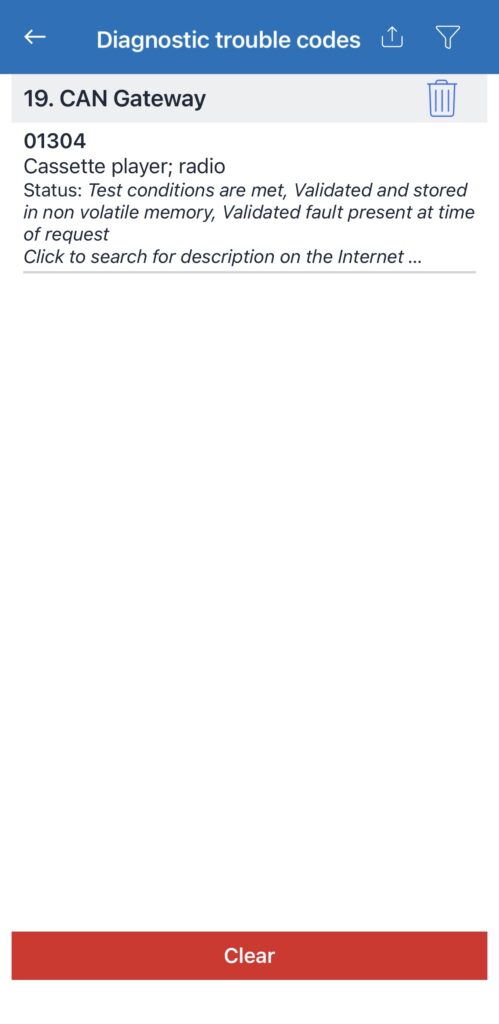
The DTC screen on Car Scanner found one stored code — 01304 CAN Gateway, described as cassette player/radio. This is a non-engine code related to the infotainment system and not something that triggers a check engine light. The engine control module showed zero fault codes. The Clear button is visible on the same screen and works in the free version without needing to upgrade.
Free version
The free version limits the dashboard to two sensors displayed simultaneously. You can still access all sensors individually through the Live data screen and fault code reading and clearing are fully available without paying. For a first-time user this is genuinely useful without spending anything.
Pro version
At INR 349 for six months — one of the best value upgrades in the app store. USD pricing varies by region; check your local App Store for the current figure.
What I didn’t like
The manual profile setup is the only meaningful frustration. A first-time user who selects the wrong profile and gets a failed connection with no guidance on why has no obvious path to fixing it. The profile list for Skoda alone contains over a dozen options and choosing between them requires knowing your engine code — which many casual users won’t know off the top of their head.
Best for: Anyone who wants accurate live diagnostic data including fuel trims, O2 sensor voltage, and boost pressure. VAG owners specifically. Beginners once the initial setup is done correctly.
Torque OBD2 — Unreliable Data Where It Counts
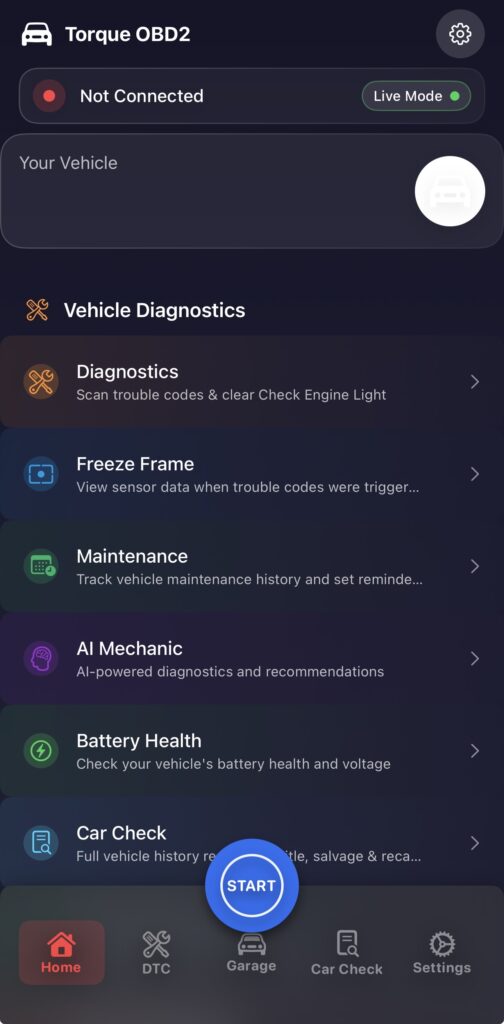
Torque is the most downloaded OBD2 app and has been recommended across automotive forums for years. Opening it you immediately see why it’s popular — the feature list includes AI Mechanic, Battery Health, Car Check, Freeze Frame, and Maintenance tracking alongside standard diagnostics. It looks and feels like a serious professional tool.
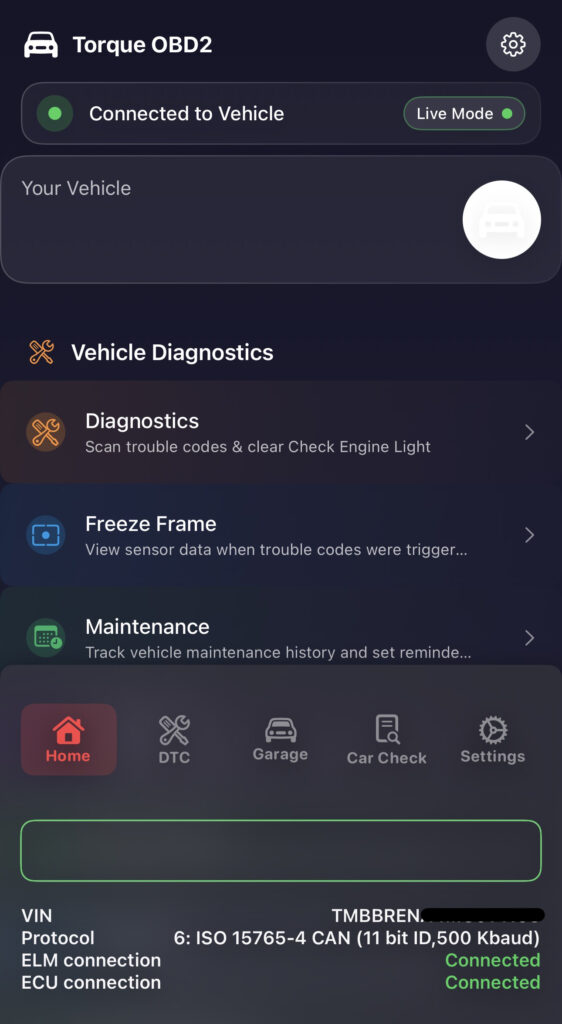
Connection is automatic — Torque detected my ECU without requiring any manual profile selection, identified the VIN correctly, matched the ISO 15765-4 CAN protocol, and showed ELM and ECU connections as green within 5 to 6 seconds. For users frustrated by Car Scanner’s manual setup, this is a genuine advantage.
The fault code screen
The DTC section is clean and well designed — Read Trouble Codes and Clear Trouble Codes are clearly presented with straightforward descriptions. The scan returned 0 codes found in 1 control module — consistent with Car Scanner’s engine result. This part of the app works correctly.
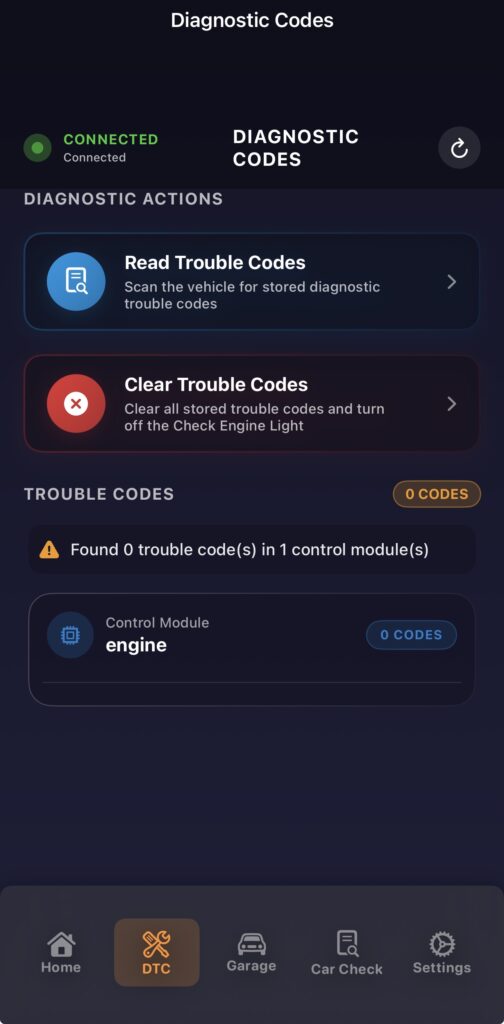
Where it falls apart — the 130% fuel trim problem
This is the most important finding from the entire comparison and the reason I can’t recommend Torque for diagnostic work.
When I opened the Advanced Sensors screen to check fuel trim data, the app displayed Short Term Fuel Trim Bank 1 as 130.0% and Long Term Fuel Trim Bank 1 as 130.0%.
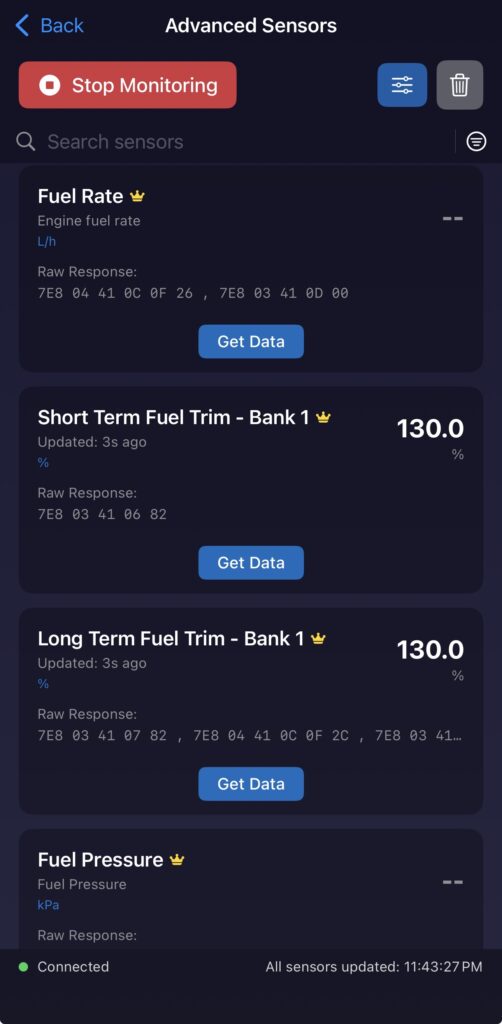
This is not a real reading. Car Scanner ELM app on the same car at the same time showed STFT at 1.56%. The raw hex response shown in Torque — 7E8 03 41 06 82 — is the same data Car Scanner uses to calculate 1.56%. Torque is applying the wrong calculation to that raw data and displaying 130% as a result.
A reading of 130% STFT on a healthy engine is not possible in any real-world scenario. The normal operating range is -25% to +25% and an engine displaying 130% would be experiencing catastrophic fuelling failure. The actual engine was idling normally at the time.
For the O2 sensor voltage, Torque displayed the parameter name but showed a “Get Data” button rather than a live updating reading — even on the pro version. Tapping “Get Data” returned no value. This is not a free version limitation that an upgrade fixes — I tested this on the paid pro plan and the result was identical. Car Scanner ELM app showed O2S1 voltage as 0.66V updating in real time on the same connection. Torque simply could not retrieve this reading from the ECU regardless of subscription tier.
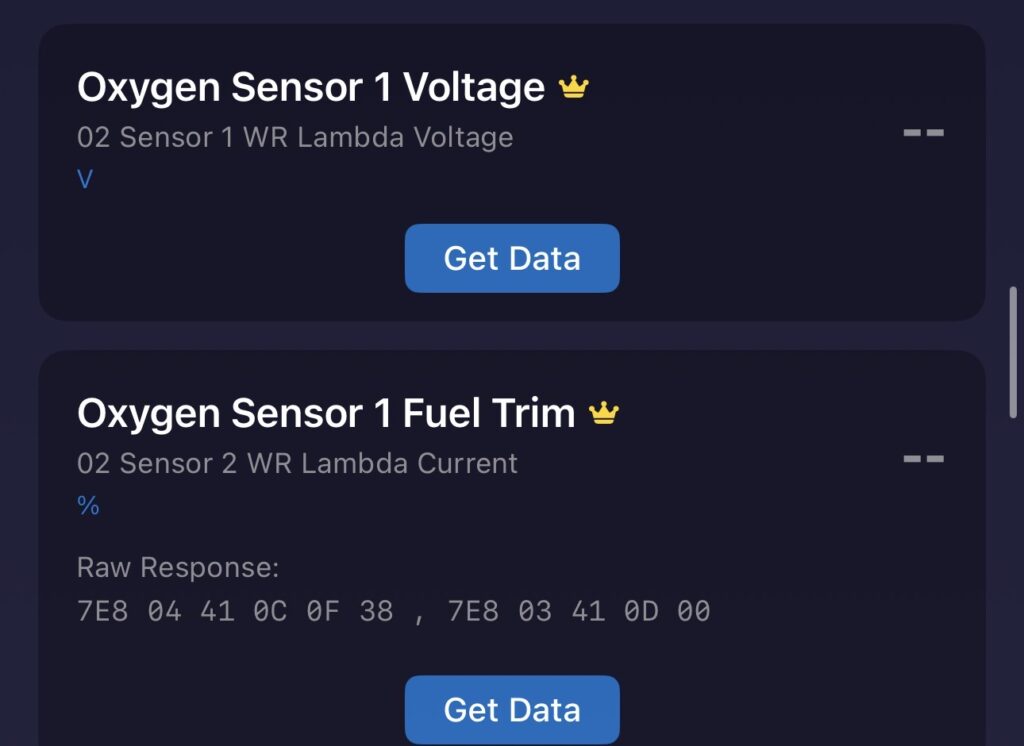
What this means practically
If you used Torque to diagnose a fuel trim problem on this engine you would see 130% and likely assume a serious ECU or fuelling fault. The actual reading is 1.56% — completely normal. This is not a minor discrepancy. It is a fundamental misinterpretation of the raw data from this ECU protocol that would lead to incorrect diagnosis.
Free version: Basic parameters — RPM, vehicle speed, and DTC scanning. Usable for a quick fault code check.
Pro version: At INR 499 per week or INR 999 per month — significantly more expensive than Car Scanner for a result that in testing was less accurate on the parameters that matter most. USD pricing varies by region; check your local App Store for the current price.
Best for: Quick fault code checks where data accuracy is less critical. Users who specifically need automatic ECU detection and find manual profile setup too difficult for their use case.
OBD Auto Doctor — Not Worth Your Time
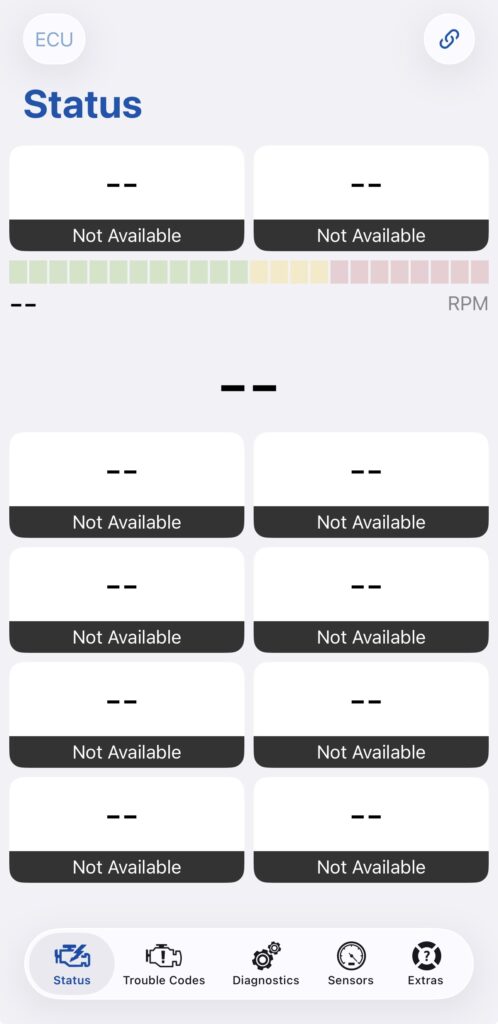
OBD Auto Doctor appears in most OBD2 app roundup articles and ranks well in app stores. The interface is clean and modern on first open — Status, Trouble Codes, Diagnostics, Sensors, and Extras tabs across the bottom.
In practice it delivered nothing useful. After connecting the adapter the Status screen showed Not Available across every single sensor tile. No live data appeared. Multiple connection attempts produced the same result. The free version showed nothing at all regardless of connection status.
I did not spend significant time attempting to troubleshoot this because a diagnostic app that requires troubleshooting before showing any data has already failed its primary function. When Car Scanner connects in 4 seconds and immediately shows accurate live readings, there is no reason to persist with an app that shows empty tiles after multiple attempts.
Best for: Nobody based on my testing experience.
Car Scanner ELM OBD2 vs Torque OBD2 vs OBD Auto Doctor
| Connection speed | |
| ECU detection | |
| STFT accuracy | |
| LTFT accuracy | |
| O2 sensor voltage | |
| Boost pressure | |
| Fault code reading | |
| Clear codes (free) | |
| Free version | |
| Ease of setup | |
| Data reliability | |
| Value for money |
Which Is the Best OBD2 App?
Download Car Scanner ELM OBD2. This is not a close call.
Pair it with the Vgate iCar Pro Bluetooth 4.0 BLE and you have a complete diagnostic setup for under $30.
It is the only app of the three that showed accurate live data on this car. The STFT, LTFT, O2 sensor voltage, fuel/air ratio, boost pressure, and MAP readings were all correct and consistent with what I know about this engine from other diagnostic sessions. The free version includes fault code reading and clearing. The pro version costs less for six months than Torque charges for one month.
The manual ECU profile setup is a genuine inconvenience on first use. You need to select your car’s make and engine from a list — choosing the wrong profile results in a failed connection with no clear error message. For VAG cars with a 1.0, 1.2, 1.4, or 1.5 TSI engine select MQB, PQ26: TSI/TFSI EA211 1.0L/1.2L/1.4L/1.5L from the Skoda, VW, Seat, or Audi profile list depending on your brand. For Toyota, Hyundai, Kia, Renault, and most other mainstream brands — select your make from the list and look for the profile that matches your engine displacement and fuel type. If the first profile fails, try the next closest match. For non-VAG cars with no specific profile available, the standard OBD2 generic profile works for basic live data and fault codes on any OBD2 compliant vehicle. Once the correct profile is set it works every time without reconfiguration.
If you specifically cannot get Car Scanner’s manual setup to work and just need fault codes — Torque OBD2 connects automatically and reads DTCs correctly. Do not use it for live data interpretation.
OBD Auto Doctor showed nothing on this car after multiple connection attempts. There is no reason to download it when better alternatives exist.
What OBD2 Adapter Works With These Apps?
All tests were conducted with the Vgate iCar Pro Bluetooth 4.0. It paired reliably with iPhone on all three apps, connected quickly, and passed through the full range of PIDs that Car Scanner needs for complete live data monitoring.
Cheap unbranded ELM327 adapters — particularly the very low cost ones from unknown brands — frequently block certain PIDs or use clone firmware that causes compatibility issues with specific ECU protocols. If you are seeing incomplete data or connection problems on any app, the adapter is often the cause rather than the app itself.
Last Updated: March 2026
FAQs
Car Scanner ELM OBD2 is the best free option. The free version reads and clears fault codes and shows live sensor data with a two-sensor dashboard limit. It works on both iPhone and Android and connects in around 4 seconds with a compatible Bluetooth adapter.
Not always — it depends on the app. Car Scanner ELM OBD2 showed correct STFT and LTFT readings on a Skoda 1.0 TSI. Torque OBD2 displayed 130% fuel trim on the same car at the same time — the correct reading was 1.56%. Always verify readings against a known baseline before diagnosing.
The Vgate iCar Pro Bluetooth 4.0 works reliably with iPhone and was used throughout this comparison. Bluetooth adapters are generally more stable than WiFi for live data on iPhone. Avoid cheap unbranded ELM327 clones — they frequently block PIDs and cause incomplete readings regardless of which app you use.
Yes — at INR 349 or $3.50 for six months it is one of the best value upgrades in automotive apps. The pro version unlocks all sensors for the live dashboard, extended PID support, and VAG-specific Coding and Service functions including service interval resets.
OBD2 stands for On-Board Diagnostics second generation. It is a standardised diagnostic system built into all cars sold in the US from 1996 and Europe from 2001. It allows external devices to read live engine data and fault codes through a standard 16-pin port located under the dashboard.

Founder of TheCarLane | Automotive Enthusiast
Ayush shares practical automotive knowledge based on real-world ownership and hands-on experience. His work focuses on diagnostics, engine systems, common car problems, and clear explanations that help everyday drivers understand their vehicles better.