
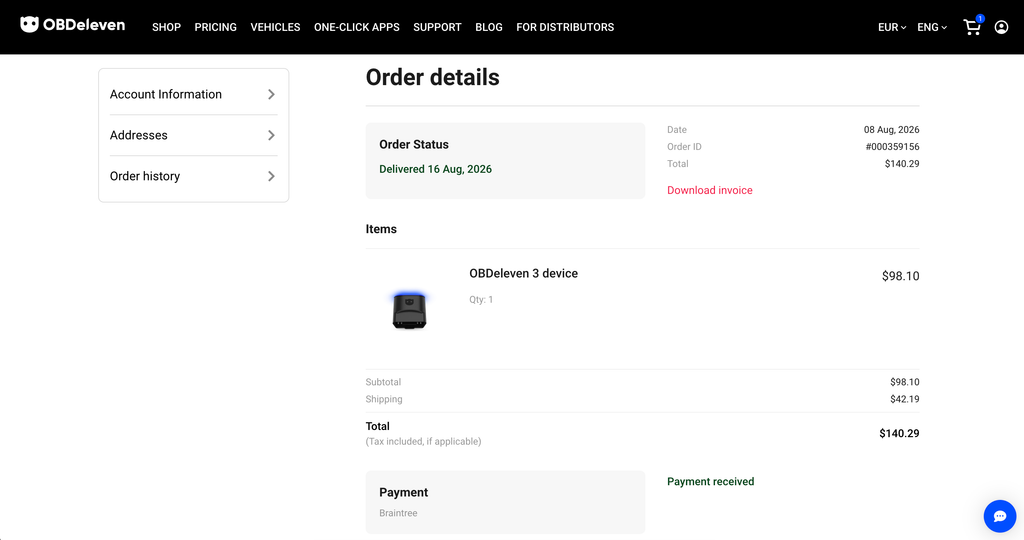
I ordered my OBDeleven 3 directly from obdeleven.com in August 2026. The device cost $98.10, DHL shipping added $42.19, and customs collected roughly ₹5,700 at my door, which put the landed cost close to ₹18,000. It arrived on August 16, and this is my OBDeleven 3 review after three weeks of testing it on the two cars I own: a 2020 BMW X5 and a 2021 Skoda Rapid 1.0 TSI, India spec.
I bought it to answer one question. I already run a ₹4,000 Vgate iCar Pro 4.0 on the Rapid every week, and it reads codes and live data without complaint. So, what does a premium coding tool at more than four times the price actually add, and does that hold up in India, where brand licensing works differently from Europe and the US?
Is the OBDeleven 3 Worth It? The Short Answer
Worth it if you want to unlock features on a supported car. Not worth it if you only want to read codes and live data. On the X5, advanced diagnostics aren’t supported in India at all, yet the app offers a long catalogue of features I can activate, and the one I paid for, an M-style cluster, worked on the first try. On the Rapid, the opposite: full advanced diagnostics on the free plan, a 35-app catalogue, and the one app I wanted most came back “Function not available.” OBDeleven 3 can do a lot for your car, but it depends on which car and which country, and that’s what I’m going to explain before you spend the money.
If you only want to read codes and live data, the OBDeleven 3 isn’t worth the money. A ₹4,000 Vgate iCar Pro BLE 4.0 does that job well, connects faster, and I still use mine every week.
If you want to unlock features on your car, it’s absolutely worth it. On my BMW, one tap gave me an M-style cluster; on my Skoda, it read the ECU’s own diagnostics for free. Manual coding and adaptations need the PRO plan, which I haven’t tested yet.
One thing before you order: One-Click Apps and adaptations depend entirely on your car and your country. Visit OBDeleven’s supported vehicles and countries page and find your car first. It’s the one step I skipped, and it would have saved me a surprise.
What the OBDeleven 3 Is, and What It Isn’t
The OBDeleven 3 is a Bluetooth adapter that plugs into your OBD2 port and talks to your car through the OBDeleven app on your phone. I ran it on an iPhone 15 Pro Max and on a OnePlus Android phone; both apps behaved the same, and everything in this review was done on the iPhone. Unlike a generic ELM327 dongle, it’s officially licensed by several manufacturers, which means it can reach every control module in the car rather than just the engine. It replaces the NextGen (OBDeleven 2) and carries five second-generation CAN-FD interfaces, so it can speak to the newer, faster modules that cheap adapters and the older device can’t.
This is what you get with each plan:
| Function | Which cars | What you need |
|---|---|---|
| Basic OBD2 scan, live data, readiness check | Any CAN-bus car from 2008 | Device only (FREE plan) |
| Advanced diagnostics (every module, manufacturer live data) | Volkswagen Group, BMW Group, Toyota Group, Mercedes-Benz, US-market Ford, where licensed in your country | Device only (FREE plan) |
| One-Click Apps | The same licensed brands; the list depends on your model | Credits, or an ULTIMATE plan |
| Manual coding and adaptations | Volkswagen Group only | PRO or ULTIMATE plan |
| Maintenance reminders, mileage check, trip tracker | Supported brands | FREE |
What It Costs Where You Are
| Where you are | Device price | Where to buy | Customs |
|---|---|---|---|
| India | ≈ ₹18,000 landed ($98.10 + $42.19 DHL + ~₹5,700 duty, what I paid) | obdeleven.com only | Duty at the door |
| EU | €84.99 | obdeleven.com, Amazon.de | None |
| UK | €84.99, ≈ £74 | obdeleven.com, Amazon UK | VAT at checkout, not at the door |
| US | ≈ $99 direct, ~$120 at Walmart | obdeleven.com, Walmart, Amazon | None |
| Australia, Canada, ME | ≈ US$99 + shipping | obdeleven.com, local resellers | Import charges apply |
Device only, checked September 2026; ships from Lithuania unless bought locally. Bundles with credits or a plan cost more.
First Impressions: It Looks Premium
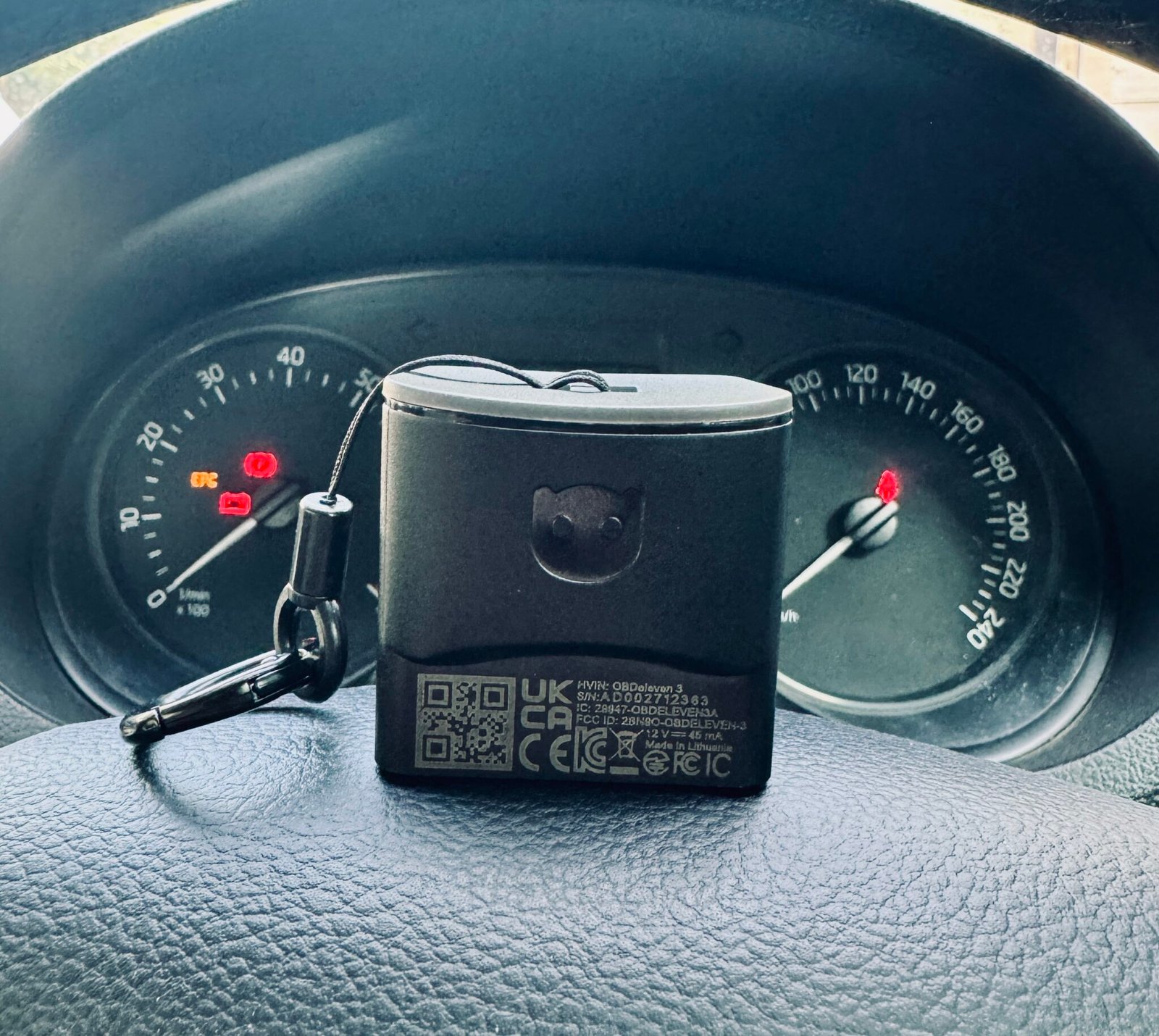
Out of the box, the OBDeleven 3 looks premium next to every other OBD adapter I own. I’ve used the Vgate iCar Pro BLE 4.0 for over a year, and side by side the OBDeleven feels like the more expensive product it is: solid build, tight seams, a proper finish, and it doesn’t look cheap from any angle.
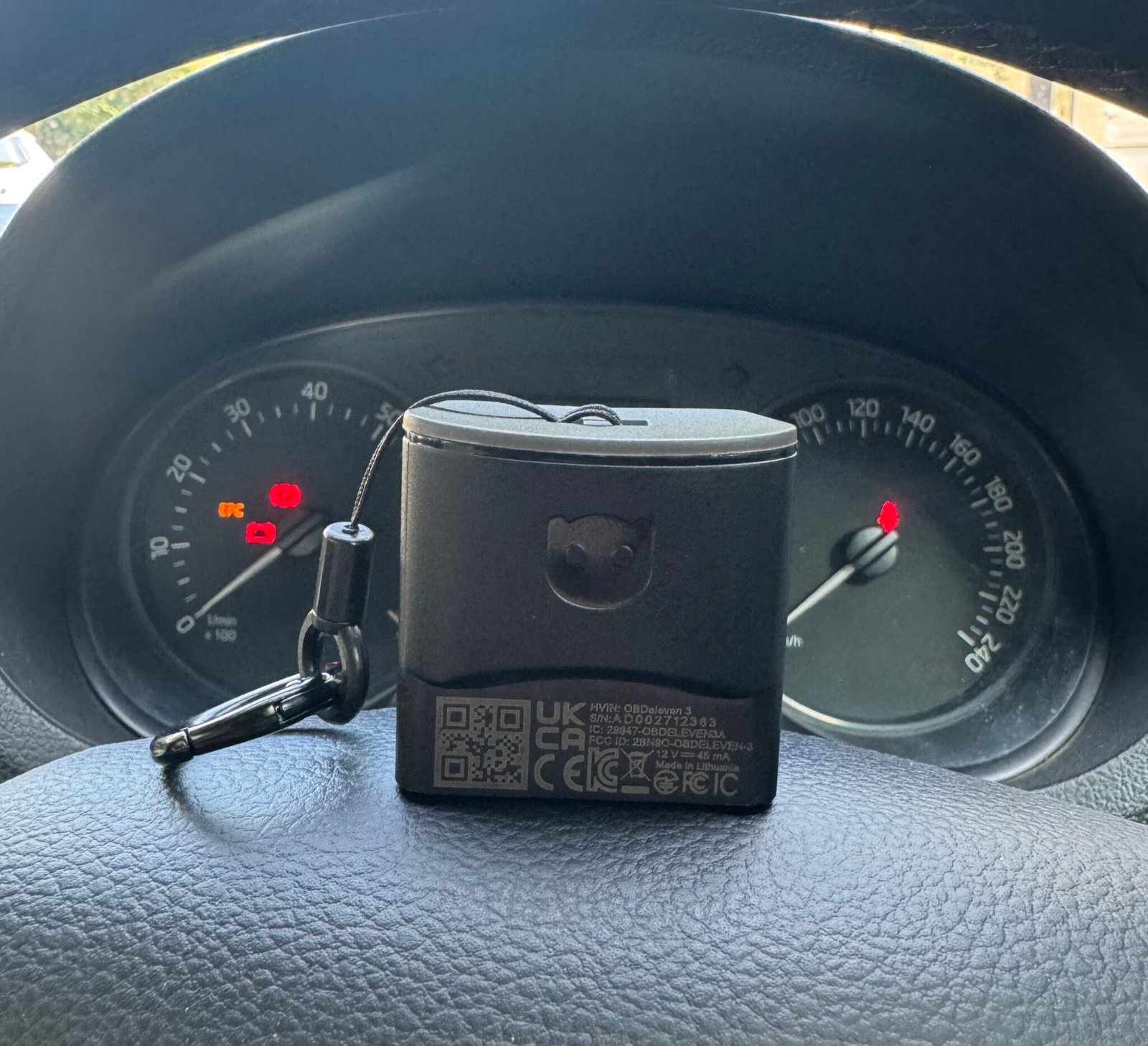
You’ll plug and unplug this hundreds of times, and it feels like it can take it.
Setting It Up and Connecting
Setup is simple:
- Install the OBDeleven app and create an account
- Plug the device into the OBD2 port
- Switch the ignition on
- Tap Connect in the app
On both cars it identified the vehicle automatically, VIN included, without me choosing a protocol.
The app finds the device on its own; you don’t pair it through your phone’s Bluetooth settings
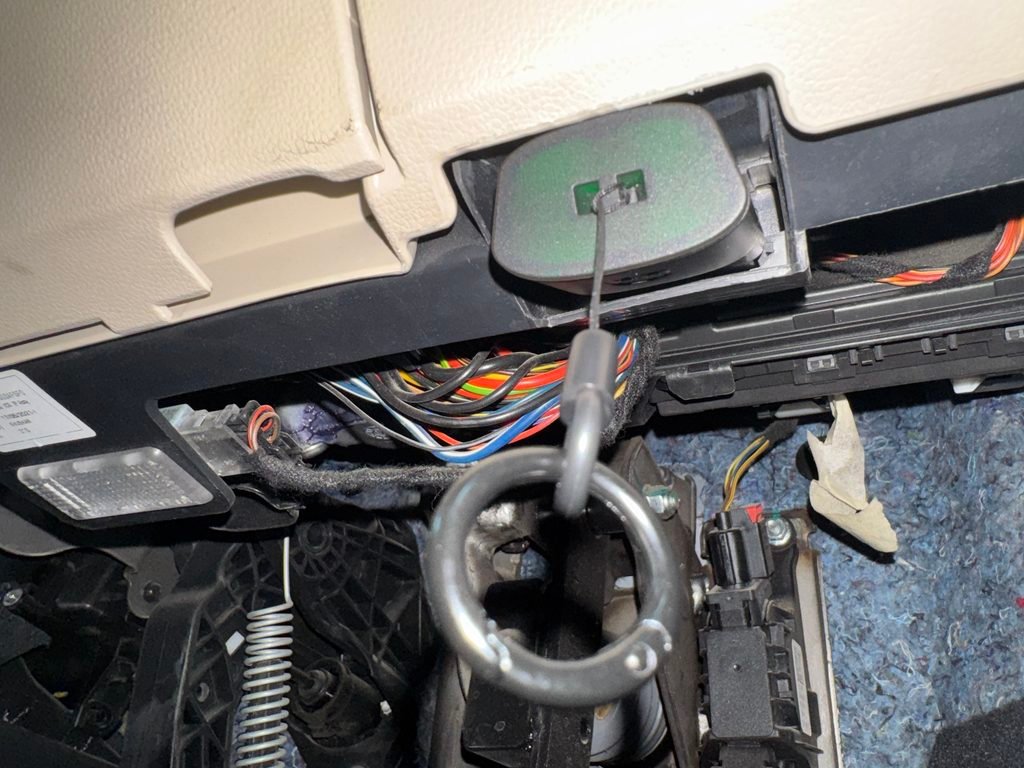
The connection is where I was disappointed. I tested it on my 2020 BMW X5 and my 2021 Skoda Rapid 1.0 TSI (India spec), and on both cars the connection takes noticeably longer than other OBD adapters I’ve used. The device pairs quickly enough, but the step from “connected” to actually reading the car drags. From a premium brand, I expected the whole handshake to finish in four or five seconds.
I also tried it on strong and weak mobile signal, and the result was the same, so the delay sits in the handshake with the car, not in the network. For context, the Vgate connects to Car Scanner on the same Rapid in two to three seconds. Part of the difference is what each one does on connect: the OBDeleven identifies every module and pulls the VIN and part numbers before it shows you anything, while the Vgate just opens a basic session.
It’s slower partly because it’s doing more, but it’s still slower than I’d expect from a device at this price.
To be fair, once the OBDeleven 3 is connected it stays connected, and it identified both cars correctly every time.
One more thing I checked without meaning to: the device stayed plugged into the X5 for the whole three weeks, including days when the car sat unused, and I saw no battery drain or warning. The label rates it at 45 mA, and in practice it behaves like something that sleeps when the car does. I wouldn’t hesitate to leave it in.
India: BMW Locked, Volkswagen Group Open
This is the finding I wish I’d checked before ordering. It is on the product page, under a “Supported countries” section, and I missed it. OBDeleven explains there that Volkswagen Group licenses diagnostics worldwide through a single entity, while other manufacturers make OBDeleven sign with individual country representatives, which takes time. BMW advanced diagnostics are listed for the EEA, US, UK, Switzerland and Turkey only. India isn’t on the list, and in India the two brands I own get very different treatment. Owners in Australia report the same “diagnostic only in your country” message, so this is policy, not a fault with the device.
On the BMW X5
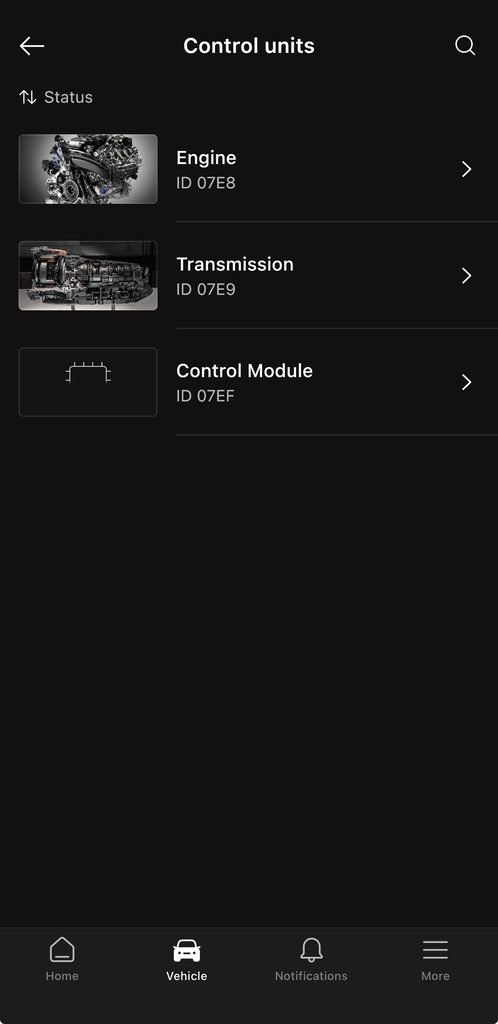
Advanced diagnostics aren’t supported. The app says so in a banner across the top of the home screen: “Only OBD2 is available in your region.” What I get is basic OBD2: three control units listed as Engine (07E8), Transmission (07E9) and Control Module (07EF), which are the generic OBD2 addresses any ₹4,000 adapter can see, not BMW’s own module list. No fault codes were stored, and there’s no way into the DDE engine module. Everything that lives inside advanced diagnostics on a BMW, including DPF regeneration on a diesel like mine, is out of reach.
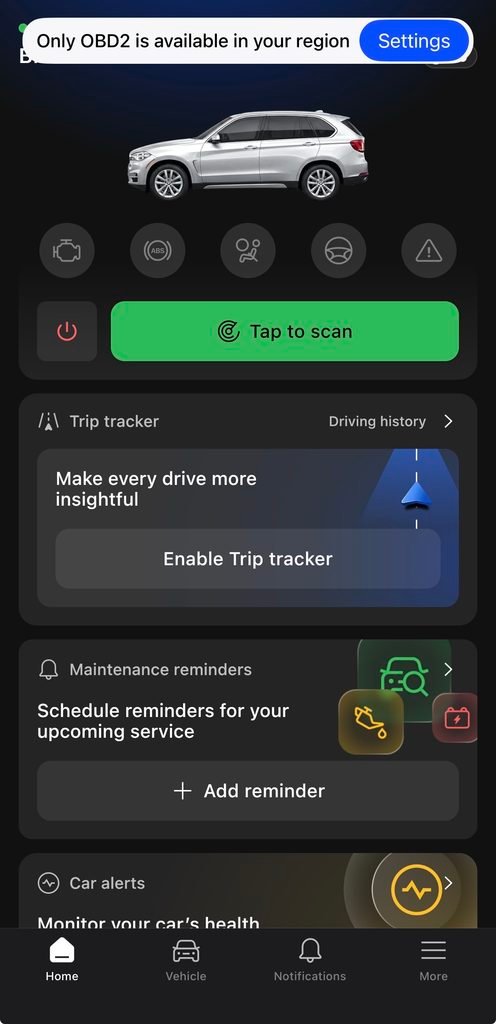
The good part is that One-Click Apps don’t depend on the licence. OBDeleven’s coverage table lists BMW apps for the same five regions, but the apps are OBDeleven’s own tool rather than manufacturer-licensed data, and on my X5 in India they activated normally, as you’ll see below. So, on a BMW in India you’re buying a customisation tool, not a diagnostic tool. Decide if that’s what you want before you pay.
On the Skoda Rapid
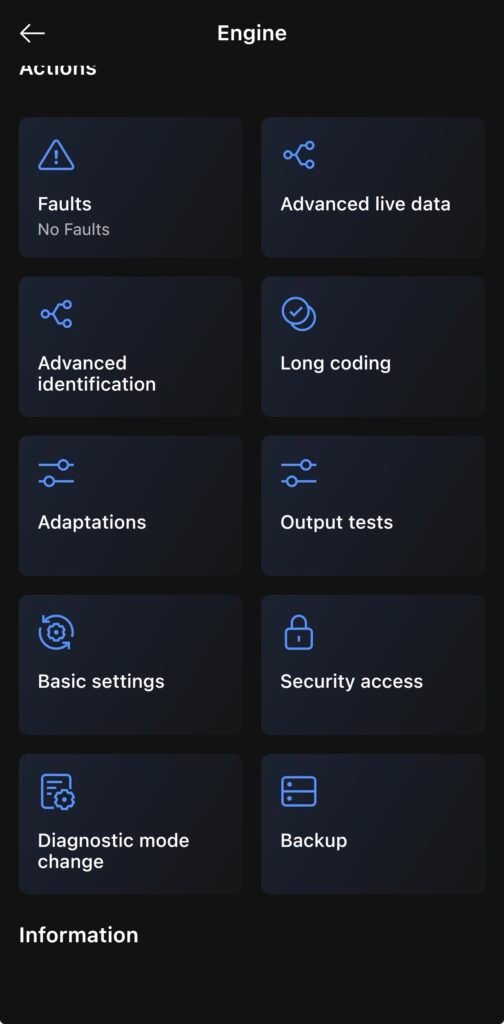
Here the device does what the product page promises. The engine module opens on the CAN UDS protocol with:
- Faults (none stored), Advanced live data, Advanced identification
- Long coding, Adaptations, Output tests, Basic settings, Security access, Diagnostic mode change, Backup
Control units:
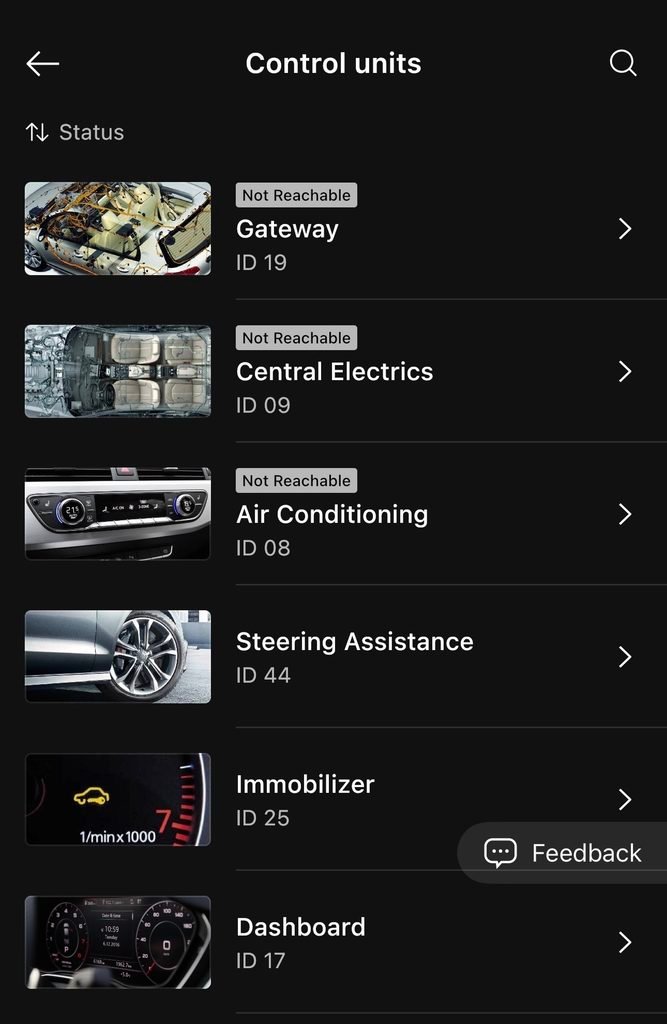
- Reachable: Engine, Brakes, Airbag, Steering Assistance, Immobilizer, Dashboard
- Not reachable, even with the engine running: Gateway, Central Electrics, Air Conditioning
I think the India-spec Rapid, an older-platform car built for this market, doesn’t expose those modules the way a European Rapid does; it isn’t the device failing.
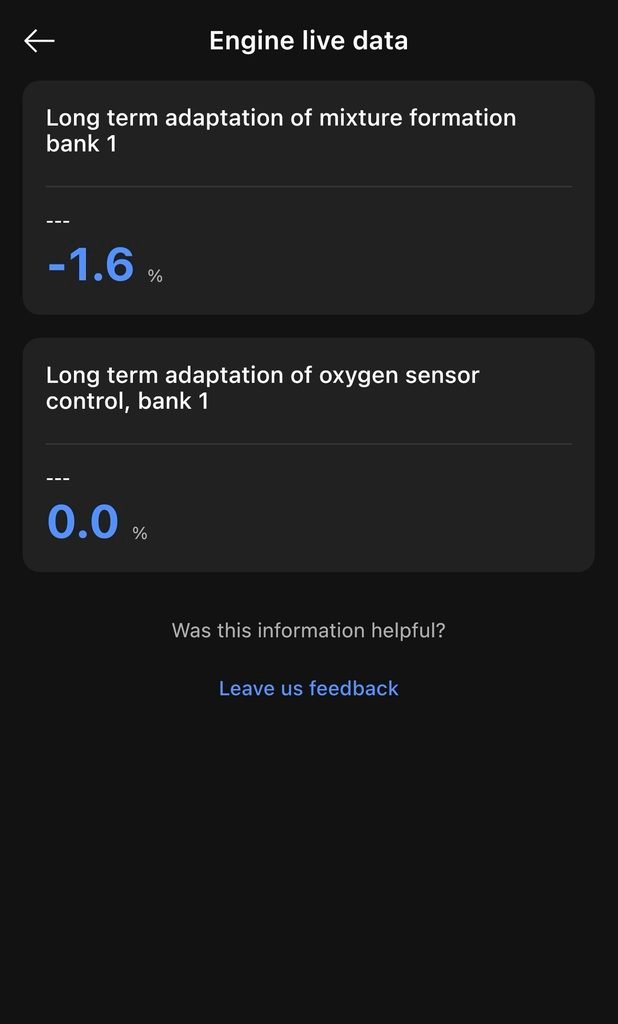
Advanced live data is the part I’d been waiting for. The app lists the ECU’s own learned values, not just the generic OBD2 set: short and long term adaptation of mixture formation, long term adaptation of oxygen sensor control, throttle-valve adaptation for the MAF, normed load, coolant temperature. My long term mixture adaptation read −1.6% at idle with the oxygen-sensor adaptation at 0.0%, which is the kind of data I normally log through Car Scanner, now with the ECU’s own labels.
Advanced identification pulls 22 fields, from VIN and hardware part number to the ASAM/ODX file version and the coding workshop code. All of this is on the FREE plan.
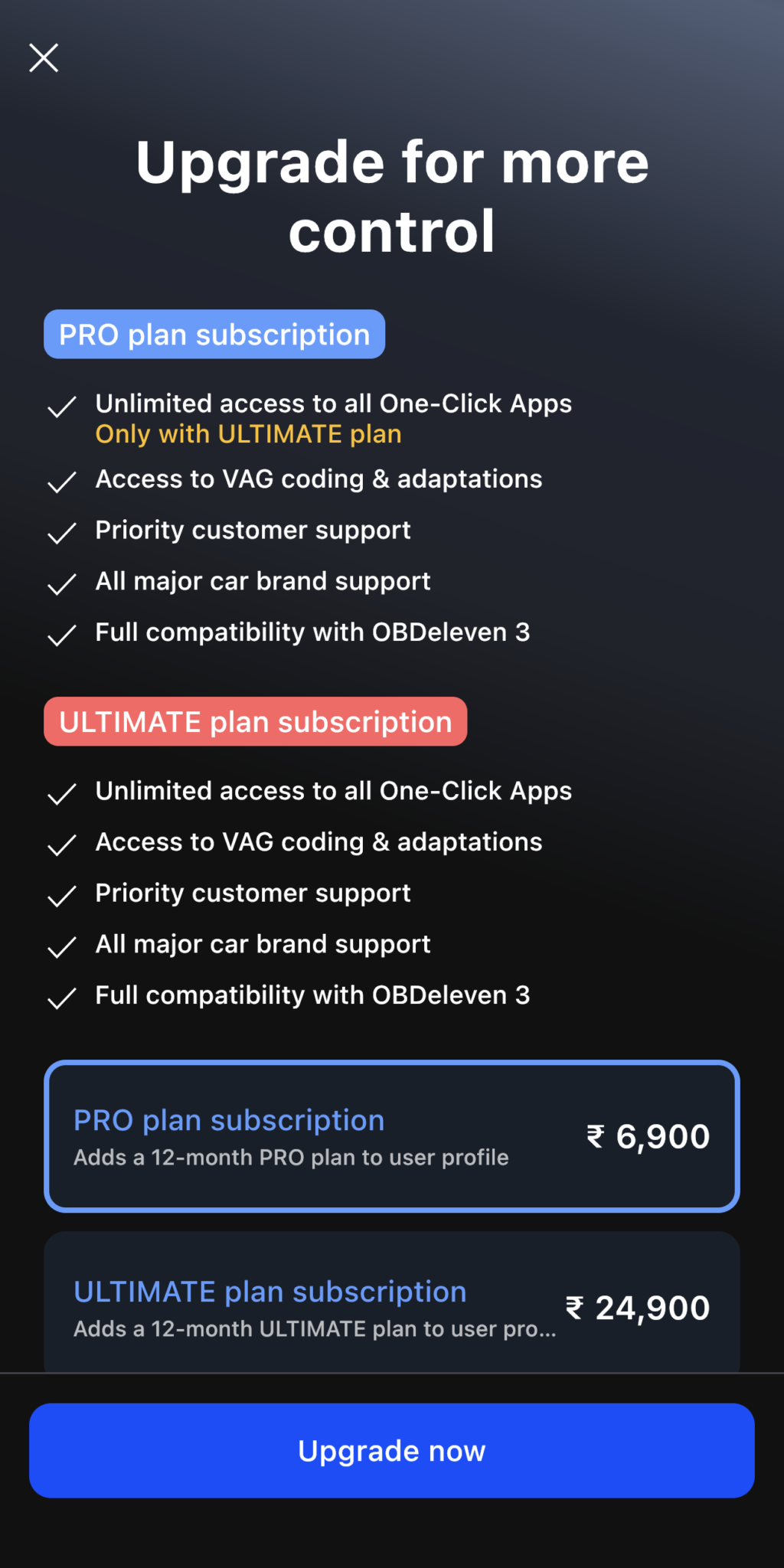
Tap Adaptations or Long coding, though, and you meet the upgrade screen: PRO at ₹6,900 a year for coding and adaptations, or ULTIMATE at ₹24,900 a year, which adds unlimited One-Click Apps. That’s where free access ends on a Volkswagen Group car in India, and I think that’s fair.
If You’re Outside India
My results are India-specific. OBDeleven’s own coverage table says:
- Volkswagen Group (VW, Audi, Škoda, SEAT, Cupra): advanced diagnostics, coding and One-Click Apps worldwide except China
- BMW, MINI: advanced diagnostics in the EEA (EU plus Norway, Iceland and Liechtenstein), UK, US, Switzerland and Turkey; elsewhere, including Australia, apps only
- Toyota, Lexus, Mercedes-Benz: advanced diagnostics in the EEA, US and UK
I tested Volkswagen Group and BMW; what I say about Toyota, Lexus and Mercedes is OBDeleven’s coverage table, not my testing.
Wherever you are, find your brand on OBDeleven’s supported-countries page before you pay.
What I Tested on the BMW X5
The X5 is where the OBDeleven 3 is worth the money. Even with diagnostics restricted, the app offered a long list of features I could activate:
- Dashboard (10–100 credits): Speedometer Scale Display, M View Style Cluster, Tire Pressure Display in Dashboard, M View Cluster Logo, Assisted Driving View, Alpina Style Display, Sport Displays in HUD
- Powertrain (50 credits each): Start/Stop Memory, Sport+ Mode, Start/Stop Deactivation, Comfort+ Mode, Default Driving Mode, Sprint Mode, ECO PRO Coasting Mode
That’s before the Lights and Multimedia tabs. I activated two: the M View Style Cluster and Sport+ Mode, 50 credits each.
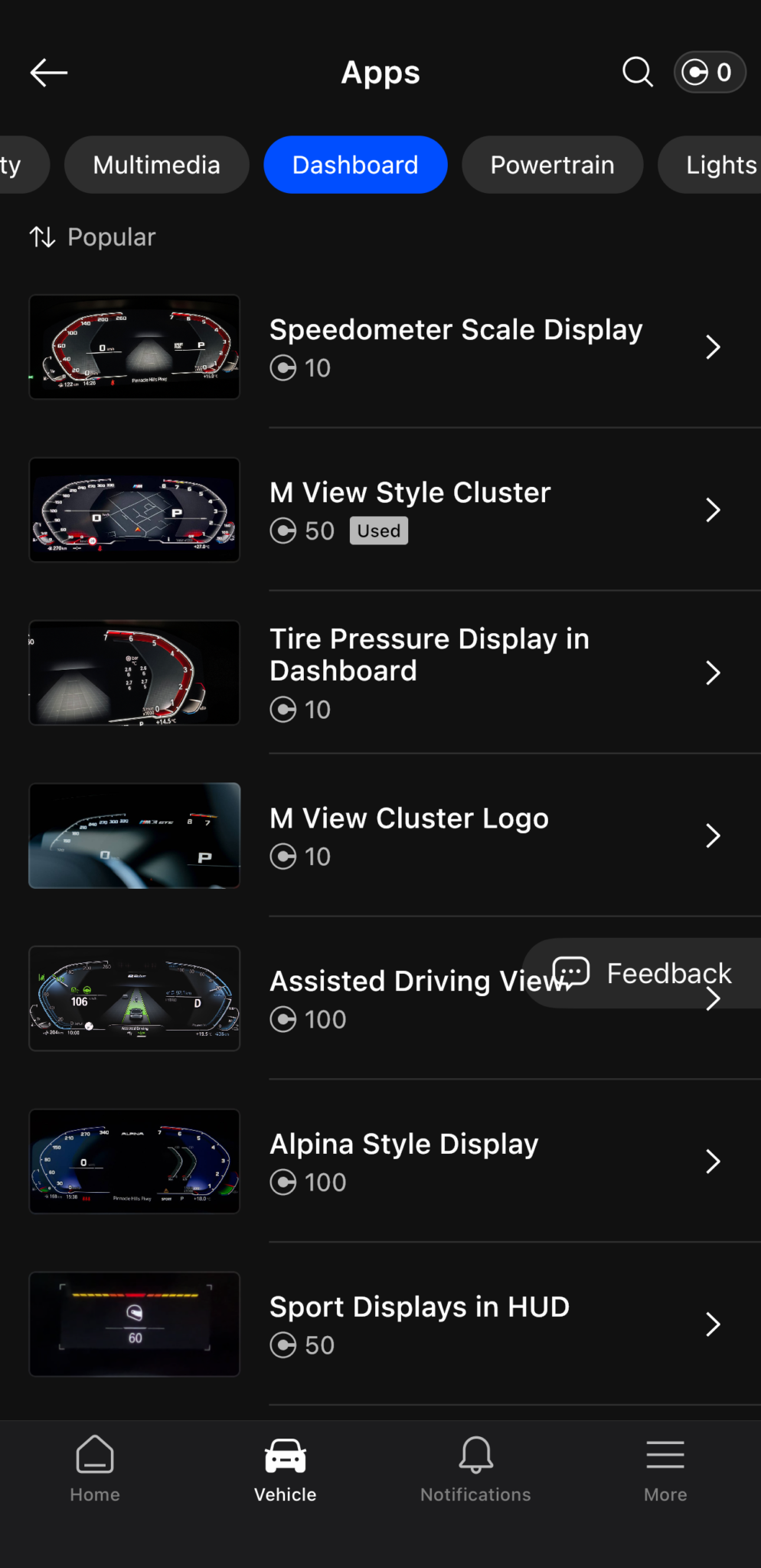
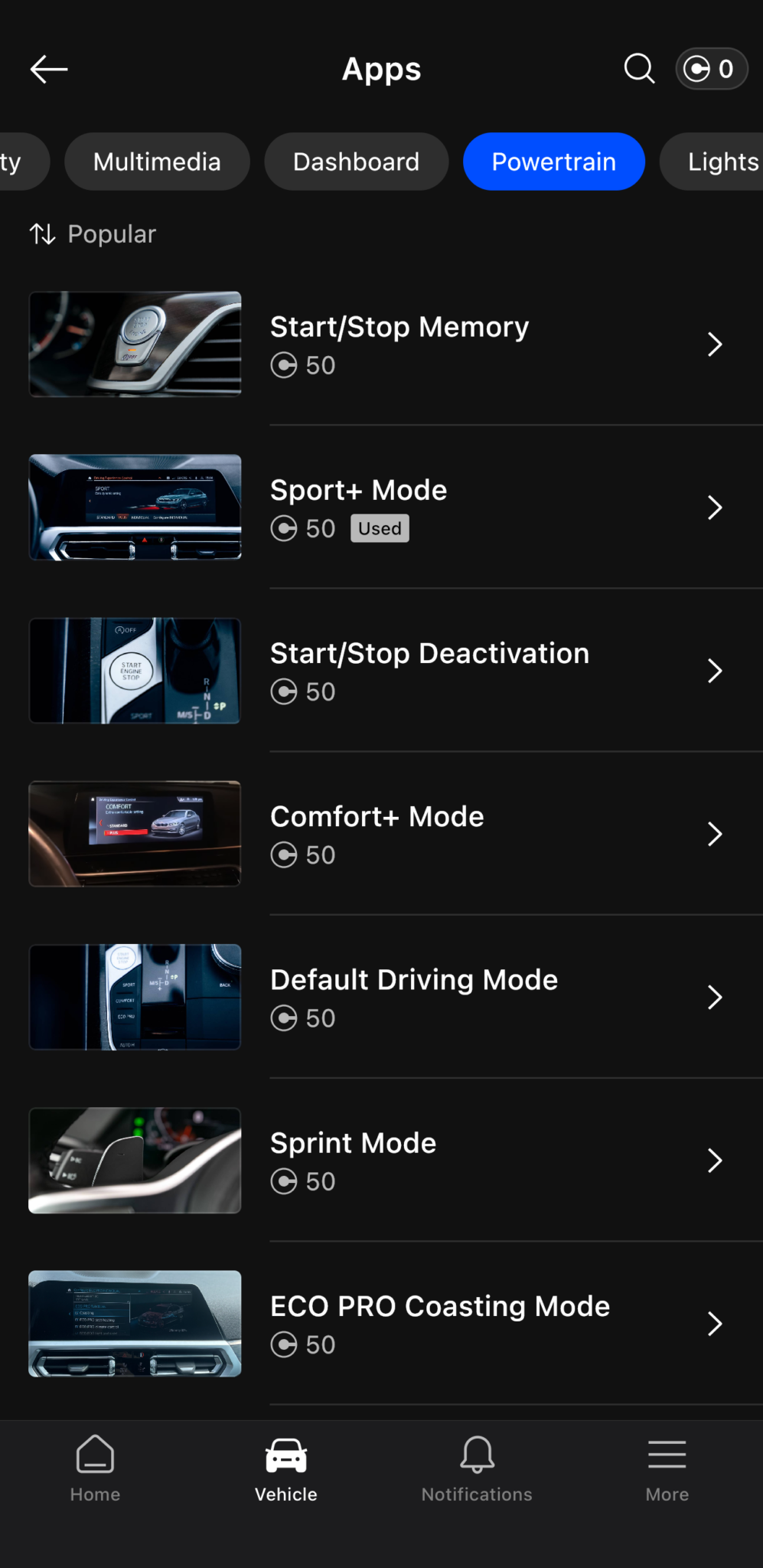
M View Style Cluster (50 credits)
Activation took one tap. The cluster switched over on the next ignition cycle, and the app marked itself “Used” in my Dashboard list. The changes are exactly what the description promises:
- The speed scale grows from a 260 km/h dial to a 330 km/h (205 mph) scale
- The right-hand gauge now shows oil temperature in degrees
- The M logo animation plays when you lock the car
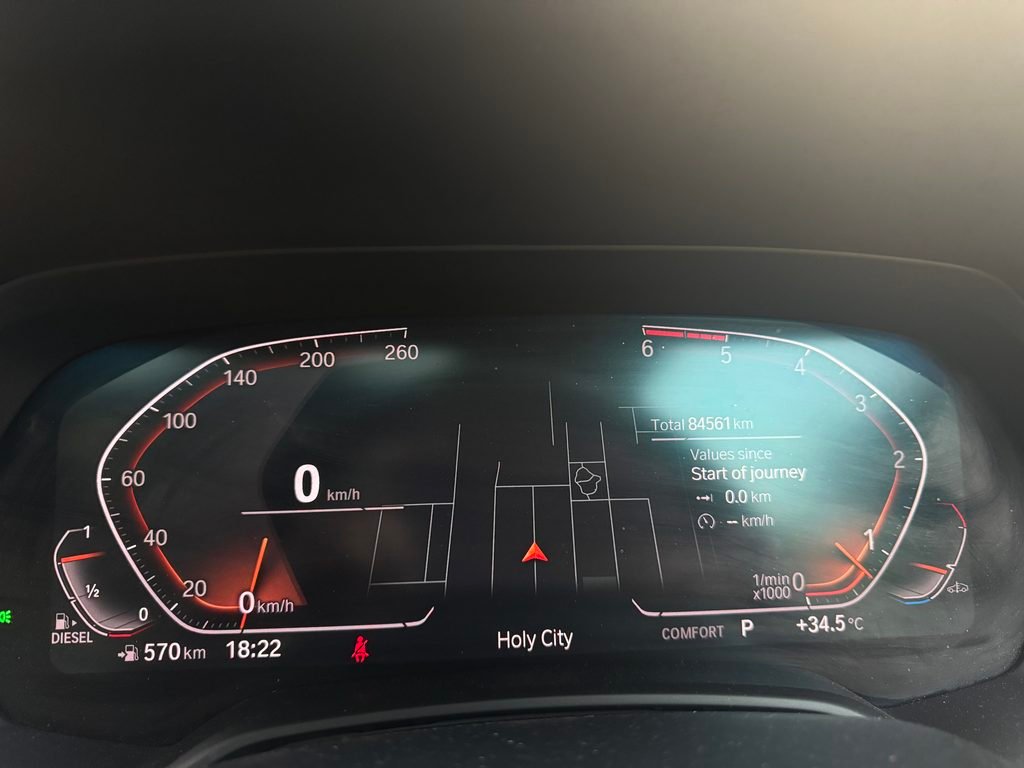
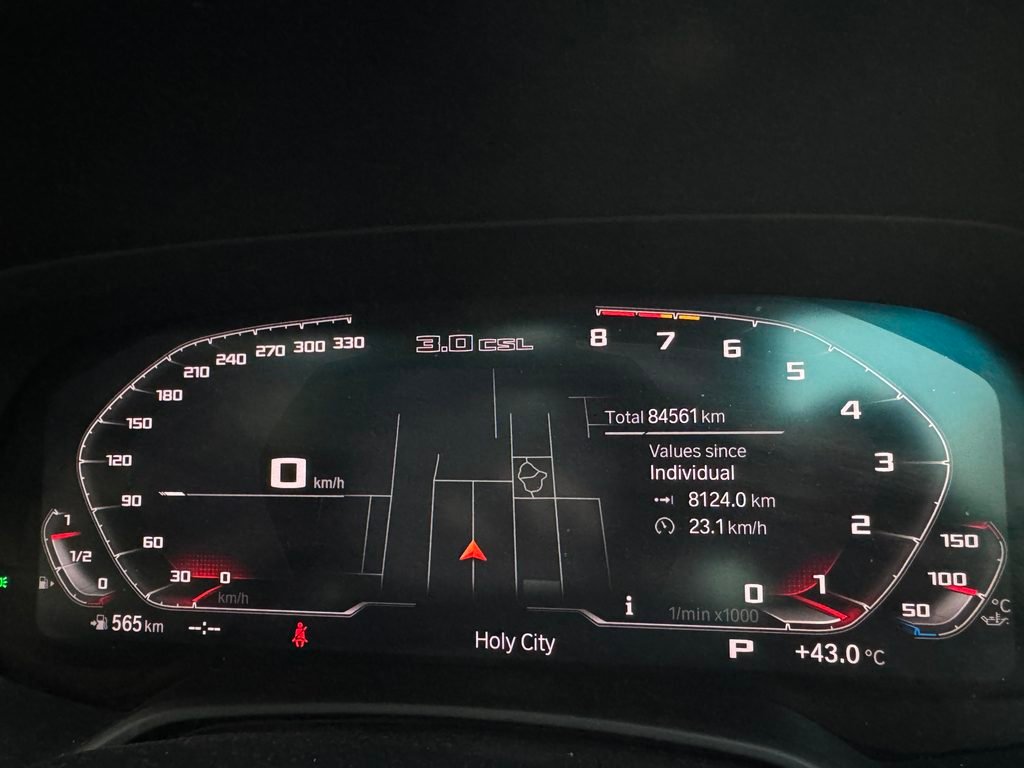
Two things to know, though. The style I chose badges the cluster “3.0 CSL”, a name from a petrol straight-six special edition, on a diesel SUV. And the tachometer runs to 8,000 rpm on an engine that runs out of revs around 5,000, so the needle will never see the top third of the dial. To be clear, that’s BMW’s own M-cluster layout the app switches on, not something OBDeleven designed. It’s only cosmetic, it looks great, and it makes no sense on a diesel. I still like it.
What I Tested On The Skoda Rapid (India Spec)
The Rapid is a Volkswagen Group car, the brand OBDeleven built its name on, so I expected it to be easy. Diagnostics worked well, but the One-Click Apps didn’t go as planned.
The list is decent: 35 One-Click Apps for my Rapid, 20 under Workshop and 15 under Adjustment. Workshop covers service-type jobs like the inspection and oil service resets; Adjustment covers the convenience settings. Not as many as the X5, but not bad.
Gauge Test – Needle Sweep (10 credits)
Unfortunately, the function wasn’t available for my car. The app listed it, priced it at 10 credits, let me select ON and tap Activate, and then returned “Function not available.” I tried again with the engine running and got the same result. The limit is probably in the car: the India-spec Rapid’s cluster may simply not support the function. But the app knows my VIN, listed the app for it and priced it, so the miss belongs to the catalogue. The 10 credits I’d bought for it stayed in my balance, which is fair, but it’s still the app I wanted most and the one that didn’t work.
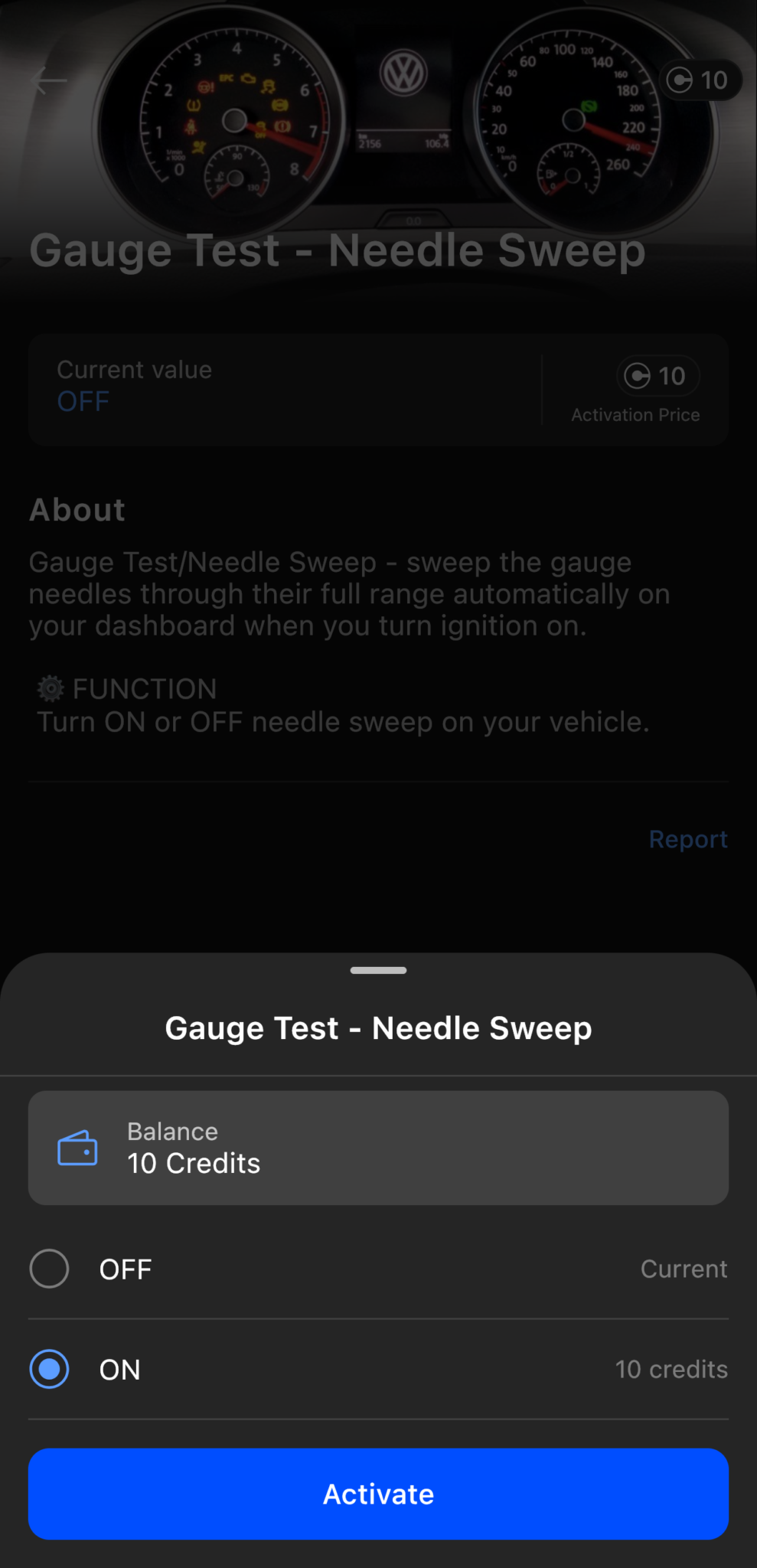
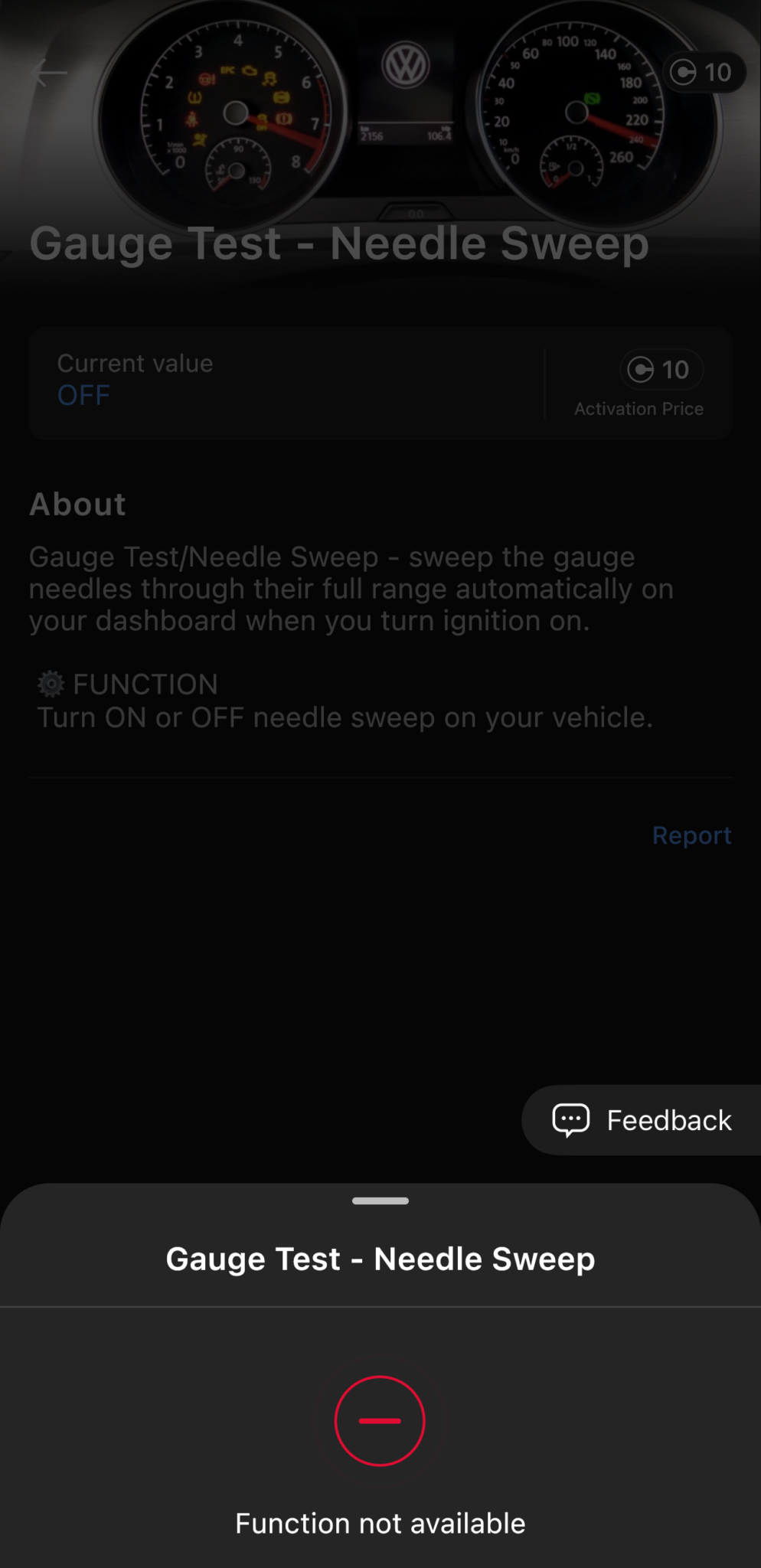
Open the app, find your model, and read the list before you pay. I did it the other way round.
Credits, Plans and What Three Weeks Cost Me
Buying the device is just the start. One-Click Apps run on OBDeleven credits: ₹399 for 10, ₹2,999 for 100, ₹9,900 for 500 in India. Credits are non-refundable once used, and reverting an app costs the same credits as activating it, so a feature you try and don’t like costs you double. The one break I got: when the needle sweep failed on the Rapid, the credits stayed in my balance.
Here’s what I spent on top of the device.
| Purchase | Price | What it bought |
|---|---|---|
| 100 credits | ₹2,999 | M View Style Cluster (50) + Sport+ Mode (50) on the X5 |
| 10 credits | ₹399 | Rapid needle sweep, which failed; credits still in the balance |
| Total | ₹3,398 | 100 credits spent, 10 unspent |
Reverting either BMW app would cost 50 credits again, so a round trip on one feature is 100 credits. Indian in-app prices also run higher than OBDeleven’s US store, even after the 18% GST built into them.
When you see “50 credits,” think 100 if there’s any chance you’ll change your mind
Which plan should you buy? Start with the device and a credit pack; that’s all I used. I compare all three, with prices for your country, in the TheCarLane’s OBDeleven plans guide; here’s the short version.
OBDeleven 3 vs Vgate iCar Pro BLE 4.0, at a glance
I’ve used both on the same car, so here’s the short version. The full comparison is coming as its own article.
| OBDeleven 3 | Vgate iCar Pro BLE 4.0 | |
|---|---|---|
| What I paid | ~₹18,000 landed | ~₹4,000 |
| Reads and clears codes, live data | Yes | Yes |
| The ECU’s own live data and all-module scan | Yes on the Rapid; basic OBD2 only on the BMW in India | Engine-focused |
| Coding and hidden features | One-Click Apps and manual VAG coding | No |
| Ongoing cost | Credits or a plan | None |
If you don’t need coding or hidden features, just buy the Vgate. If you only own a BMW and want the apps, BimmerCode is the direct alternative; if you only own a VAG car and want deep manual coding, VCDS still is.
OBDeleven 3 Pros and Cons
What I Liked
- Left plugged into the X5 for the whole three weeks with no battery drain
- Build quality: it looks and feels like the more expensive product it is, and it took three weeks of plugging and unplugging without a mark
- One-Click Apps on the X5: one tap, one ignition cycle, a different cluster, with no dealer visit and no laptop and cable
- Free-plan diagnostics on the Rapid: the ECU’s own live data and labels, deeper than anything a generic adapter can reach
What I Didn’t Like
- The restriction of features for India: no advanced diagnostics on the BMW, which on a diesel means no DPF regeneration either
- The connection time, slower than a ₹4,000 adapter on both cars
- The credit system, specifically that the same credits you spent to activate a feature are charged again to revert it, which I really didn’t like
Who It’s For
The OBDeleven 3 is for owners who want to unlock features on their car, not just read OBD data. Keep one thing in mind, though: what you can unlock depends entirely on your car and your country.
Who It’s Not For
It’s not for owners who only want to read their car’s OBD data and logs. A basic, cheap scanner like the Vgate iCar Pro BLE 4.0 does that job well, and a $100 adapter, closer to ₹18,000 landed in India, for general data reading isn’t worth it. For that use, I won’t recommend it.
Verdict: Who Should Buy the OBDeleven 3, and Who Shouldn’t
The OBDeleven 3 is a powerful, well-built adapter that can change what your car does, and on the X5 it proved it. On the Rapid it proved something different: the diagnostics are real and free, and the catalogue is bigger than I expected, but the one app I wanted didn’t work. It’s also restricted on BMW in India, slower to connect than it should be, and it charges you twice for a feature you change your mind on. All of this is true, so the decision depends on which car you have and where you live.
On my cars in India, that came out as: a Volkswagen Group owner gets proper diagnostics and a decent app list on the free plan, and a BMW owner gets customisation apps and nothing else. Owners in a fully licensed market get the whole product on either brand. Either way, the OBDeleven app shows you your car’s app list and OBDeleven’s site shows your country’s coverage before you spend a rupee, a pound or a euro. Check both. TheCarLane Verdict at the top of this review gives you the short version.
FAQs
No. Diagnostics are free with the device. Credits cover One-Click Apps. PRO (₹6,900/year in India) is only for manual coding and adaptations, and it doesn’t include credits.
A few apps a year: credits. Manual coding: PRO. Lots of apps: ULTIMATE (₹24,900/year), which includes them unlimited. Reverting an app costs the same credits again; a failed activation costs nothing.
Don’t pair it in your phone’s Bluetooth settings; tap Connect in the app instead. Ignition on, wait 20–30 seconds, internet on. It was slow on both my cars, but it always connected.
Yes. I used mine on a BMW X5 and a Skoda Rapid. Credits belong to your account, not the car. Coverage depends on the brand and your country.
Not by itself, but dealers can see coding changes in the module history, and a fault traced to a change you made can be refused. OBDeleven keeps a backup of every module it touches; revert your changes before a warranty visit and restore them after.
Last Updated: September 2026

Founder of TheCarLane | Automotive Enthusiast
Ayush shares practical automotive knowledge based on real-world ownership and hands-on experience. His work focuses on diagnostics, engine systems, common car problems, and clear explanations that help everyday drivers understand their vehicles better.